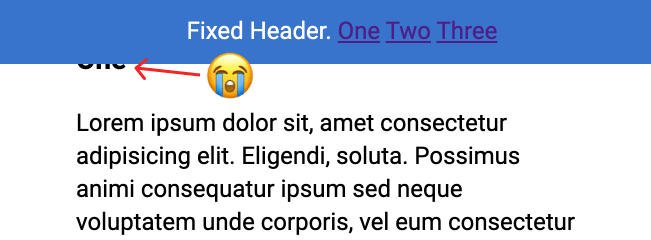
If you’ve ever implemented a design with a fixed header, you’ve surely had this problem:
You click a jump link like
<a href="#header-3">Jump</a>which links to something like<h3 id="header-3">Header</h3>. That's totally fine, until you have aposition: fixed;header at the top of the page obscuring theh3you're trying to link to!Fixed headers have a nasty habit of hiding the element you’re trying to link to.
Thankfully Chris Coyier from CSS-Tricks found and shared the straightforward solution:
h3 {
  scroll-margin-top: 5rem; /* whatever is a nice number that gets you past the header */
}
🐛 As noted in the comments below this doesn’t work Safari. In that browser you’ll need to use scroll-snap-margin-top. All other modern browsers do have excellent support for scroll-margin-top and play nice.
~
To not have to apply the CSS rule to too many elements, I’d adjust the snippet to use the :target selector.
The
:targetCSS pseudo-class represents a unique element (the target element) with anidmatching the URL’s fragment.
That way it will work with any internally linked thing (headers in all their sizes, anchors, etc):
:target {
  scroll-margin-top: 5rem;
}
It was also nice to see that Mattias Geniar used this solution when implementing the Smooth Scrolling Sticky Navigation I wrote about earlier (Mattias is using scroll-padding-top though).
Fixed Headers and Jump Links? The solution is scroll-margin-top→
~
Thank me with a coffee.
I don’t do this for profit but a small one-time donation would surely put a smile on my face. Thanks!
To stay in the loop you can follow bramus on Bluesky or subscribe to the RSS feed.


Unfortunately, this doesn’t seem to be working in Safari (not even in Safari 13.1). Could be https://bugs.webkit.org/show_bug.cgi?id=189265 or https://bugs.webkit.org/show_bug.cgi?id=179379.
Also, be sure to not have overflow hidden set on any parent elements!