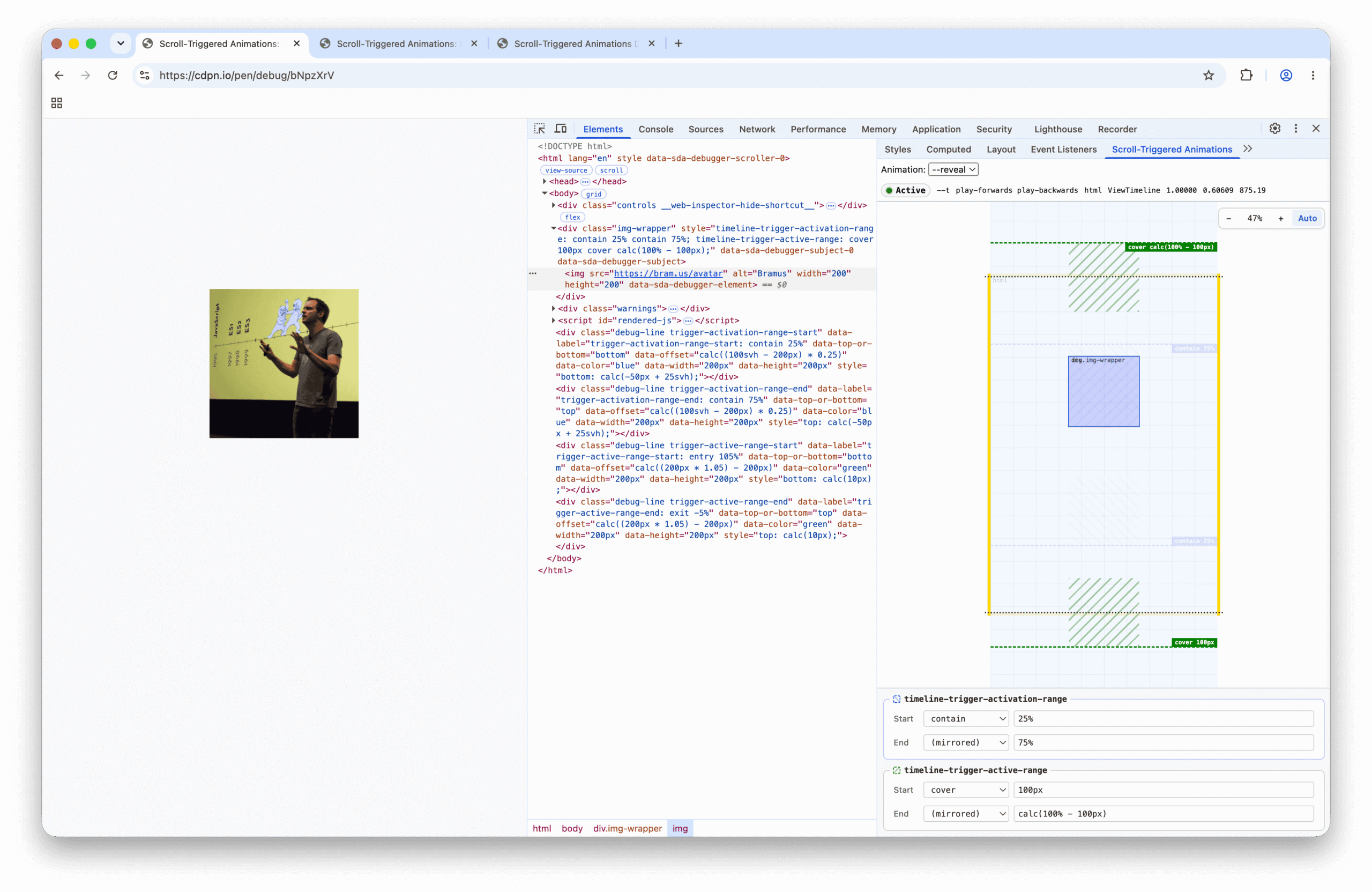
I’m extremely pleased to announce the release of Scroll-Triggered Animations Debugger, a DevTools extension to visualize and debug CSS Scroll-Triggered Animations.
~
Table of Contents
~
# Demo
To jump right in, here’s a video of the extension in action:
The extension adds a new pane named “Scroll-Triggered Animations” to Chrome DevTools’s Elements Panel and offer the following debugging features:
- Visualize the Scroll-Triggered Animation’s scroller, element, and subject in an interactive minimap
- Supports both
ScrollTimeline(scroll()) andViewTimeline(view()). - Shows an active/inactive status light indicator that switches from red (Inactive) to green (Active) when the trigger activates.
- Plays nice with
position: sticky. - Visualize the
timeline-trigger-activation-range(blue) andtimeline-trigger-active-range(green) debug lines and boxes. - Edit the
timeline-trigger-activation-rangeandtimeline-trigger-active-rangevalues live.
~
# Get the extension
The extension is available on the Chrome Web Store:

If you like this extension, please leave a review on the Chrome Web Store.
There is also a repository on GitHub where you can report issues and file feature requests.
~
# Backstory
While exploring CSS Scroll-Triggered Animations earlier, I built a set of demos that included an in-page debug overlay to help me make sense of what was going on, such as this debug demo on CodePen:
See the Pen Scroll-Triggered Animations: Trigger Ranges Visualizer by Bramus (@bramus)on CodePen.
That demo visualizes the activation range (in blue), the active range (in green), and also includes a little status light that switches from red (Inactive) to green (Active) whenever the subject crosses the trigger boundaries.
Back in 2023, I had built the Scroll-Driven Animations Debugger DevTools Extension which solved a very similar problem for Scroll-Driven Animations by adding a minimap and range editor to Chrome DevTools’s Elements Panel.
So I fired up Antigravity, pointed it to the source code of my Scroll-Driven Animations Debugger extension along with the Scroll-Triggered Animations visualizations I had explored on CodePen, and tasked it with combining the two into a dedicated DevTools extension for Scroll-Triggered Animations.
Because the architecture for communicating between the inspected page and the DevTools sidebar pane was already figured out in the Scroll-Driven Animations Debugger, and the visualization was already prototyped in the CodePen, Gemini had all the info it needed to build this new Scroll-Triggered Animations extension in no time 🙂
~
# Known Issues and Limitations
While the extension is mature enough to be released as version 1.0.0, there are a few things I could not work around due to browser and API limitations. These are collected in the FAQ for the extension:
-
Issue #1: Ranges declared with relative or viewport units — such as
90vh— get reported as calculated pixel values in the Range Editor.This is not a bug in the extension, but a limitation of how the browser exposes these values: both the
Animationinstance andgetComputedStyle($element)resolve specified relative values into computedpxvalues. Short of parsing the raw stylesheets and running my own CSS cascade, there is no API to retrieve the authored units.Ideally, I want to have a function (in DevTools, but preferably DOM) that allows me to get the specified styles for an element. This request is tracked in w3c/csswg-drafts#10002 and crbug//447469710
-
Issue #2 and Issue #3: The extension doesn’t work with elements inside an
iframe, either showing a “Could not read the required data from the element.” error or falsely claiming that there are no Scroll-Triggered Animations attached to the element even though there are.This is caused by a bug in Chrome DevTools (crbug/1480418): when querying
$0viachrome.devtools.inspectedWindow.evalfor an element inside aniframe, DevTools either reportsundefinedor lies and returns the last selected node from outside theiframe. Because of this browser limitation, the extension won’t work on CodePen’s Editor View directly — you’ll need to open the demo in CodePen’s standalone Debug View first.
~
# Future Plans
The short-term plan is to fix any bugs that might surface once people start using the extension and look into a few planned enhancements (feel free to file an idea in the repo).
Just like with the Scroll-Driven Animations Debugger Extension I built, the long-term plan is for this extension to eventually become obsolete once Chrome DevTools gets built-in debugging support for Scroll-Triggered Animations. Until then, this extension exists to fill that gap.
~
# Spread the word
Feel free to reshare one of the following posts on social media to help spread the word:
~
🔥 Like what you see? Want to stay in the loop? Here's how:
I can also be found on 𝕏 Twitter and 🐘 Mastodon but only post there sporadically.
