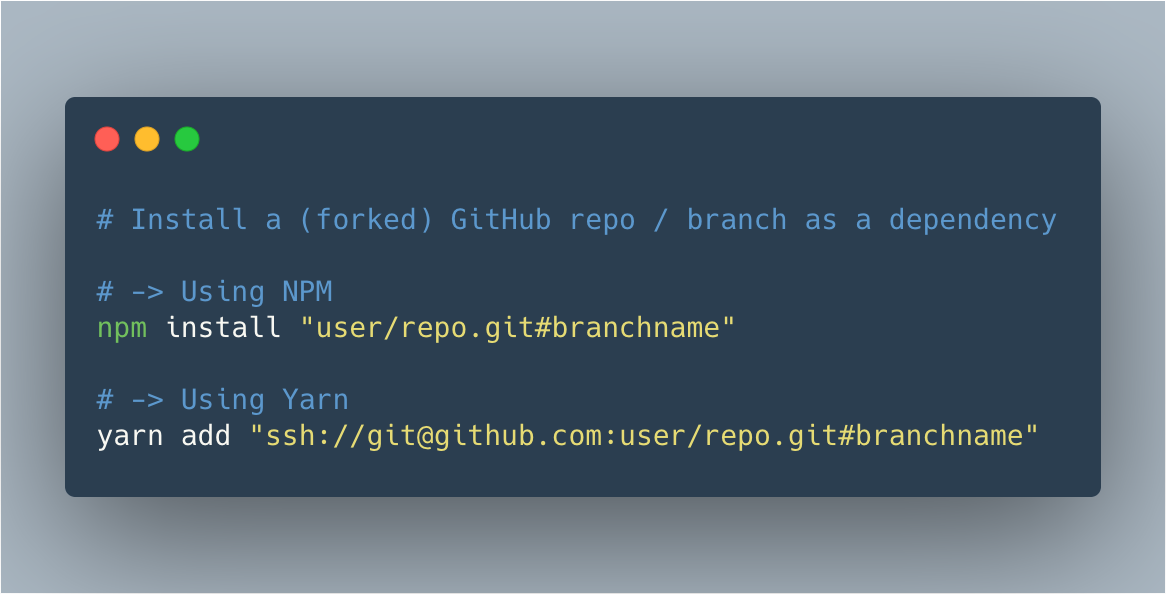
Recently I needed to test a branch of a forked GitHub repository inside a project. Instead of cloning the fork and symlinking the package locally, I installed the remote dependency directly into the project.
To achieve I used the following command:
Using NPM:
npm install [email protected]:user/repo.git#branchnameor
npm install git+ssh://[email protected]:user/repo.git#branchnameUsing Yarn:
yarn add ssh://[email protected]:user/repo.git#branchname💡 If you’re targeting a specific commit or tag, replace branchname with the commmithash or tagname. You can also omit the #branchname to get the default branch, typically main/master
~
With npm install there are some shorthands you can use, as it by defaults tries to look up things from GitHub when detecting the user/repo pattern:
npm install githubuser/repo
npm install github:githubuser/repo
To install things from other popular/public Git servers, change the github: to one of the supported vendors:
npm install github:githubuser/repo
npm install bitbucket:bitbucketuser/repo
npm install gitlab:gitlabuser/repo
Finally, npm install also supports installing gists from GitHub:
npm install gist:githubuser/gistidThe githubuser/ here is optional, so you can simply pass in the gistid as well.
You can read all about this in the npm install docs.
~
Thank me with a coffee.
I don’t do this for profit but a small one-time donation would surely put a smile on my face. Thanks!
To stay in the loop you can follow bramus on Bluesky or subscribe to the RSS feed.