About a month ago, WebKit gained support for interactive-widget. While it’s not clear whether this will end up in Safari or not, this is pretty exciting news: If you have ever had a virtual keyboard obscure your fixed navigation bar, then interactive-widget is for you.
This post details a quick recap of what the feature does, how we got here, and a sneak peek at it running in WebKit.
~
# The backstory: Interop 2022
Back in 2022, I did a lot of research into viewports as the lead of the Viewport Investigation Effort, part of Interop 2022.

While that effort still hasn’t led to an actual Interop Proposal (due to the lack of proper mobile testing, something that is in the works ever since 2023 😏), one of the outcomes was that we at Chrome changed how viewports get resized when the virtual keyboard gets shown in Chrome on Android.
~
# Enter interactive-widget
Where Chrome used to resize the layout viewport by default, its behavior changed in Chrome 108. As of that version, which shipped in 2022, Chrome only resizes the visual viewport, thereby aligning its behavior with that of Safari.
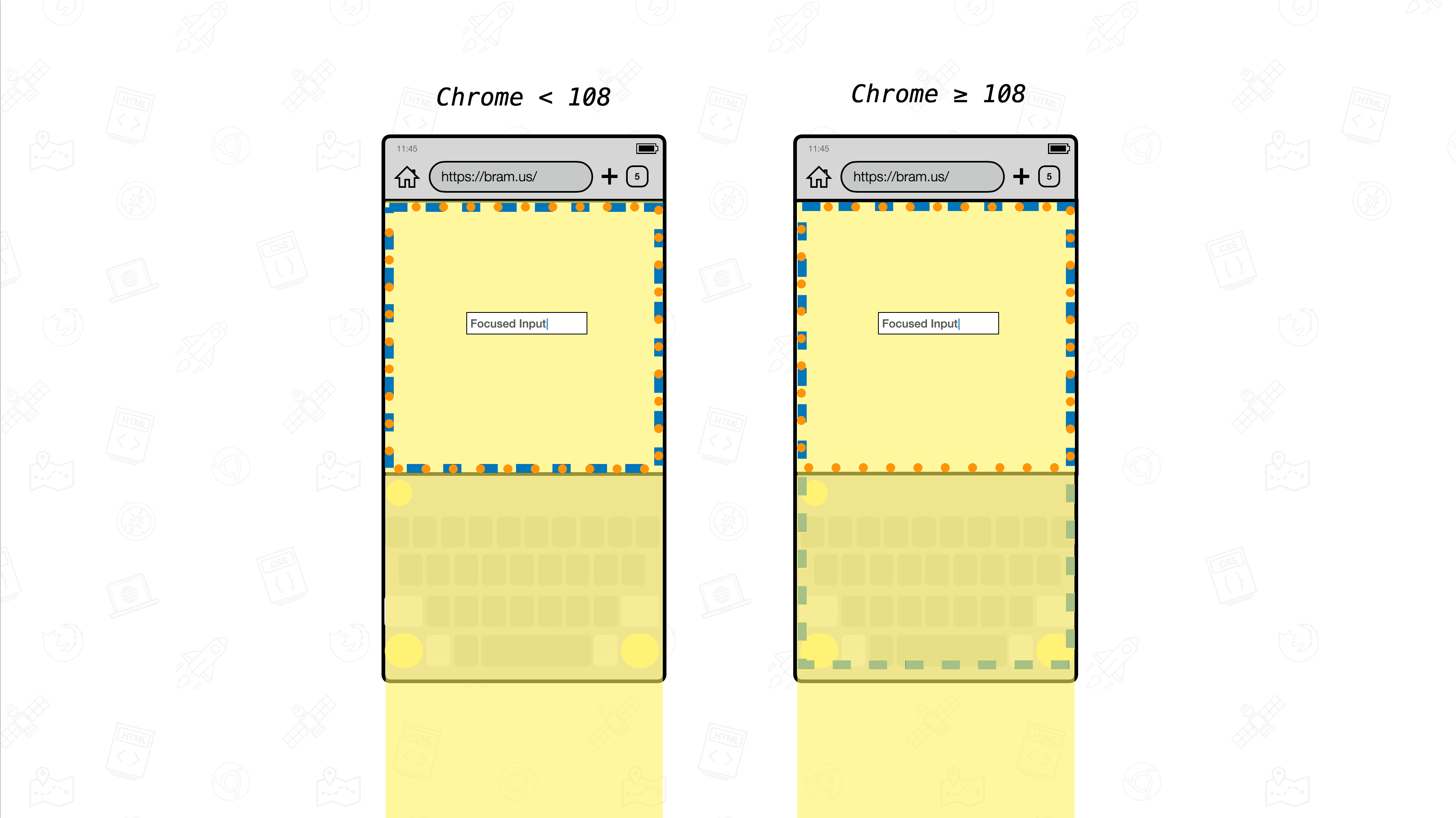
The side-effect of this change, though, is that you could end up with position: fixed content that gets obscured by the virtual keyboard:

position: fixed content. In the new behavior, that content can get obscured by the virtual keyboard.As some developers heavily relied on the old behavior — or just want to have a fixed bottom toolbar that sits atop the virtual keyboard – we at Chrome developed a way to control what should happen when the virtual keyboard pops up: the interactive-widget directive for use in the viewport <meta> tag.
<meta name="viewport" content="width=device-width, initial-scale=1.0, interactive-widget=resizes-content">The directive accepts three values:
resizes-visual: Resize only the Visual Viewport but not the Layout Viewport (default behavior).resizes-content: Resize both the Visual Viewport and Layout Viewport.overlays-content: Do not resize any viewport. This is similar to using the Virtual Keyboard API withoverlaysContentset totrue.
Put visually:

interactive-widget. The orange dotted box is the Visual Viewport. The blue one is the Layout Viewport. Both resize differently depending on the value of interactive-widget.~
# Available in WebKit
About a month ago (mid-August), I was surprised to read a comment on the WebKit GitHub repo that interactive-widget had been implemented in WebKit.
Eager to test this out, it quickly became clear that this was not exactly possible without building WebKit yourself and running it using a simple browser shell called MobileMiniBrowser on the iPhone Simulator. A pity, as I don’t think all web developers out there can find their way around that.
Anywho, today I bit the bullet and built WebKit locally. Some time later (with fan noises as background music throughout) I had MobileMiniBrowser open in an iPhone Simulator with the Viewport Resize Behavior demos open.

resizes-visual
resizes-content
overlays-contentWhile interactive-widget works fine in MobileMiniBrowser (hooray!), I still would like to test things in a real Safari on iOS. For that I will probably have to wait for Safari 27.1 to come, which, I guess, will be the version that will include this change. It is not clear though, because the Safari Technology Preview release notes have no mention of interactive-widget, even though Safari on desktop shows it in the list of feature flags …

Reason I would like to test Safari on iOS itself, is because its UI differs a lot from the MobileMiniBrowser. For example, I’d like to see if and how Safari’s floating address bar influences things here. It’s probably fine already — there’s clever people work on Safari after all — but ever since viewport-fit ended up getting broken in Safari 26 (and still is broken to this day), I’d like to double check.
(💭 Side thought: If only there were a Safari Technology Preview for iOS …)
~
# Browser Support
💡 Although this post was originally published in September 2026, the list below is constantly being updated. Last update: September 11, 2026.
interactive-widget is supported in the following browsers:
- Chromium (Blink)
-
✅ Supported in Chrome 108 (Android)
- Firefox (Gecko)
-
✅ Supported in Firefox 133 (Android)
- Safari (WebKit)
-
⏳ In development. Implemented in the WebKit source, but not yet shipped in a public release of Safari or Safari Technology Preview.
~
# Closing thoughts
I’m excited to see interactive-widget, a feature I helped shape, become part of WebKit. Hopefully it will come to Safari as well, so that developers can get control over how the viewport should resize when the virtual keyboard gets shown. To learn more about interactive-widget, check out the following resources I’ve authored:
- Control the Viewport Resize Behavior on mobile with
interactive-widget→ - Viewport vs Virtual Keyboard Resize Behavior Explainer →
- Prepare for viewport resize behavior changes coming to Chrome on Android →
~
🔥 Like what you see? Want to stay in the loop? Here's how:
I can also be found on 𝕏 Twitter and 🐘 Mastodon but only post there sporadically.
